Have you ever wanted to play a quick game of chess while waiting
to board your
plane at the airport? Are you a daily bus or rail commuter who would
love to play a game en route to or from work? Do you ever find yourself torn
between playing a game of chess or going outside and enjoying the sunshine and
fresh air of a beautiful day? Chess programs
for smartphones, tablets, e-readers, portable gaming systems, and handheld chess
computers, make it easy to
start or
resume a game of chess almost anywhere anytime. Handheld chess can be a lot of fun.
Best of all, there are no pieces to lose!
This page is divided into 3 main sections. First a few
chess programs for Apple's iOS platform are
reviewed.
Secondly, chess
apps/tablets for the
Android platform are listed. Finally,
older dedicated chess handheld units and programs are
discussed.
A Few Chess Options
for Apple Products
I've owned an iPad since April 2010 and have found it to be my
favorite device for portable chess. Apple's iOS platform, which consists
of the
iPad,
iPad-Mini,
iPod-Touch, and
iPhone,
are all capable of running much of the very best portable chess software available.
Immediately below is a brief description of the chess programs on
my iPad.
Stockfish
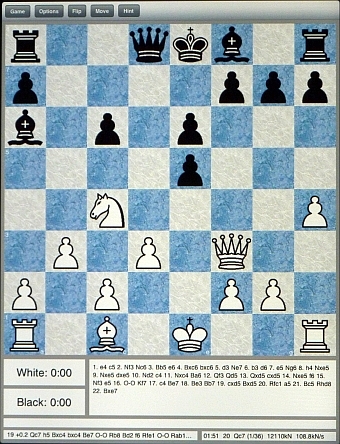 There's an old
saying that goes "the best things in life are free". This may
be true when you're talking about chess programs for the iPad. I say
this because of
Stockfish. Stockfish is one of the very best chess programs
for the iPad and it doesn't cost a cent. Stockfish has an extremely wide
level of difficulty settings. The strength of the computer engine can be
adjusted in 50 Elo point increments from 0 to 2500. That's 50
different strength levels! "Permanent brain" (a feature that
controls whether the computer "thinks" on your time), can be easily switched on
or off.
Additionally, 6 different playing styles are offered: "Passive, Solid, Active,
Aggressive, Suicidal, and Random". In my own
testing, Stockfish has proven to be
a formidable opponent even against desktop computer programs rated 2500 Elo and higher!
I sometimes believe that the strength levels listed in Stockfish may be a bit
too conservative. That is, if one plays Stockfish at the Elo setting of
1000, that corresponds more accurately to an Elo setting of 1200 or 1300 on
other chess programs.
There's an old
saying that goes "the best things in life are free". This may
be true when you're talking about chess programs for the iPad. I say
this because of
Stockfish. Stockfish is one of the very best chess programs
for the iPad and it doesn't cost a cent. Stockfish has an extremely wide
level of difficulty settings. The strength of the computer engine can be
adjusted in 50 Elo point increments from 0 to 2500. That's 50
different strength levels! "Permanent brain" (a feature that
controls whether the computer "thinks" on your time), can be easily switched on
or off.
Additionally, 6 different playing styles are offered: "Passive, Solid, Active,
Aggressive, Suicidal, and Random". In my own
testing, Stockfish has proven to be
a formidable opponent even against desktop computer programs rated 2500 Elo and higher!
I sometimes believe that the strength levels listed in Stockfish may be a bit
too conservative. That is, if one plays Stockfish at the Elo setting of
1000, that corresponds more accurately to an Elo setting of 1200 or 1300 on
other chess programs.
As with the other chess programs reviewed on this page,
Stockfish allows you to easily set up a position for analyses or for solving
chess puzzles from books. However, the implementation of this feature, at
least on my iPad, seems a bit odd. When "Edit position" is selected, a
much smaller representation of the chessboard appears where you can add/remove
pieces as needed. It would have been much easier if Stockfish would
have allowed you to directly edit the full size chessboard represented on your
device's screen rather than on a miniaturized board. I can imagine that on
an iPad-mini, editing a position with Stockfish might be pretty tough!
Stockfish can also be used like a regular chess board (you move both sides), and
as an analysis tool. Stockfish comes with a very rich set of features
including the ability to automatically record and email your game. The email feature automatically
formats your game into PGN format for easy importing into other chess programs. Stockfish is optimized to take full advantage of both
the iPhone and iPad platforms. It does a great job of supporting multiple
finger gestures and there are numerous options for customizing the board colors
and piece sets. You can even select to turn on/off "figurine notation" if
desired. If you own an Apple portable device and love chess,
you've got nothing to lose by downloading and giving
Stockfish
a try.
Chess Pro - with coach, Chess Lite -
with coach, & Chess Free - with coach
Developed by Christophe Theron, author of
Chess Tiger,
"Chess
Tiger Pro" formerly (Chess Pro with coach) is a first rate program that can be used at
all levels of chess play. Players, who are brand new to the game of chess, will
find everything they need to learn the game. Experienced chess
enthusiasts, who wish to perform extensive analysis of their games, will also
find this program to be invaluable.
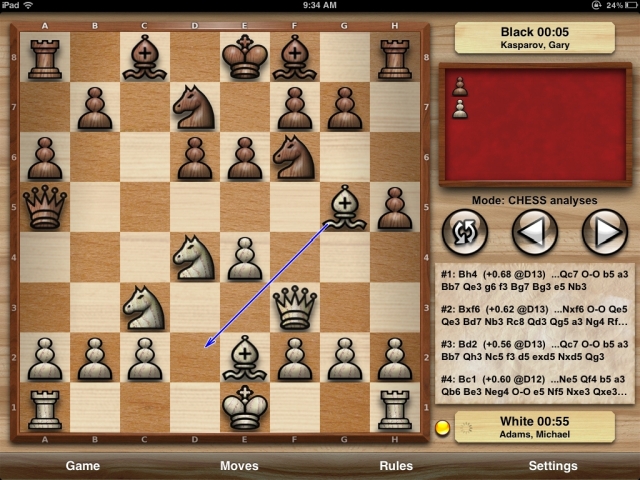
Originally this program was designed only for the iPhone in mind. However,
"Chess
Pro - with coach"
has received a major update that takes advantage of the iPad's larger and
sharper screen. This program
offers the best "visual thinking" feature that I've ever seen in any
chess program. If selected, the program will display the best moves being
considered (or recommended) using a series of green arrows. The most
favored moves are displayed with the thickest and brightest arrows. Less
favored moves with thinner and dimmer arrows.
The "Enable variations" functionality in "Chess
Pro - with coach" is extremely useful. You can try out
an unlimited number of variations when
analyzing a game and then easily get back to the "main line" when
ready. Even if you don't use the advanced functionality of "Enable
variations", I find this program to be the best program for easily navigating
forward and backwards thru a chess game. When I just want access to
a "virtual chessboard", I'll set this program to human vs human mode with its
computer analyses turned off.
This program offers all the usual features and functionality
that one expects in a high-quality modern chess program. You can import
and export games, select a wide selection of strength and playing style
settings, choose from a number of different chess boards and piece styles, set
up human vs human, human vs computer, or computer vs computer games. As
with Stockfish,
Chess Pro - with coach makes it very easy to email a game
in PGN format. This comes in very handy when you wish to send your
completed game to another computer for further analyses. Whether you're an absolute beginner or expert player, you'll find a
lot to like in this program. Prices vary throughout the year. "Chess
Pro - with coach" typically retails around $10.
Sometimes you can find it on special for around $4.
There is also a lower-cost option. With "Chess
Lite - with coach" you don't have as wide of strength levels
to play against. Otherwise it is pretty much full featured and typically retails for $4.
Note: I was developing a
more detailed
review of "Chess
Pro - with coach" but various life changes have caused me to
abandoned that effort.
Chess.com
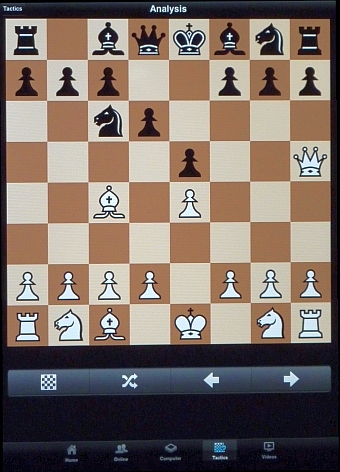 Another chess app I
frequently use is
Chess.com.
With this program you can play chess online
against other opponents, play against the computer,
analyze games, watch a number of different instructional chess videos, or
practice chess tactics with Chess.com's "Tactics Trainer" offering.
Another chess app I
frequently use is
Chess.com.
With this program you can play chess online
against other opponents, play against the computer,
analyze games, watch a number of different instructional chess videos, or
practice chess tactics with Chess.com's "Tactics Trainer" offering.
Indeed, "Tactics Trainer" is my favorite Chess.com feature. This selection
allows you to practice various chess tactics and (optionally) be scored on how
quickly you solve the various puzzles presented to you. Hundreds of
different tactical puzzles are available that explore the whole range of
different situations you may find yourself in. Sometimes you are looking
to win material, other times you're going for checkmate. Many of the
puzzles involve sacrificing significant material before the combination pays
off. I have enjoyed many hours in "Tactics Trainer".
How much you can do with Chess.com
depends on your Chess.com membership level. The free membership
level is actually pretty good in that you can play against the computer and do a
limited number of
tactical exercises per day. (It seems to me that if you
turn off your internet access before launching Chess.com, you'll be able to do
additional tactical exercises beyond what is normally offered by the free
membership level.)
Chess.com's paid membership options range from "Gold" membership at $5 per month
to "Diamond" which costs $14 per month. You can save money if you pay by
the year with Gold costing $29/year and Diamond at $99 per year. There's
also a "Platinum" level membership at $49 per year, but only Diamond level gives
you access to the training videos. I find the free option to be adequate
for my needs but I have had an opportunity to sample a number of the training
videos and they are pretty good.
The board graphics in Chess.com are excellent and
customizable. There are 10 different strength level settings for the computer
opponent with 5 different styles of play available. These selections should be more than adequate for
beginners and casual players. However, strong club players, (those rated over 1600), may need
to look elsewhere as the computer opponent in Chess.com is not particularly strong.
If you're looking for the option of playing against extremely strong computer
opponents, consider using
Stockfish or "Chess
Pro - with coach".
Shakki
 Note: The below summary is based on the original version of Shakki.
An update for Shakki was released in mid-June 2013. I've already discovered a few bugs
that were not there in the original version. I do not recommend Shakki at this time.
Note: The below summary is based on the original version of Shakki.
An update for Shakki was released in mid-June 2013. I've already discovered a few bugs
that were not there in the original version. I do not recommend Shakki at this time.
Update: It appears that Shakki is no longer available via
the iOS App store. I'll leave this review online for now, but may remove
it soon.
Shakki is Finnish for "chess" and is the title for a chess program developed by Ulf Bierkamper.
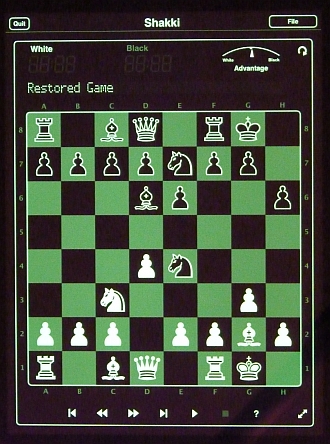
What attracted me to Shakki was its look on the iPad. In its default
setting, the graphics are razor sharp and stand out very beautifully against a
jet black background. Though green is the default, you can choose from
just about any color under the rainbow. You can also opt to reverse the colors.
That is, have the chess graphics superimposed on a pure white background. Shakki also employs some
clever graphics on its main "Settings" navigation page. "Behind" the
buttons where you can start a new game, resume the current game, edit the board,
or load a previous played game, you will see chess pieces randomly drifting
across the screen in the background. It's certainly not essential to have
such a feature in the program, but it is a nice touch that shows some
serious work went into the creation of the graphics for this program.
Though Shakki only offers one piece type for the chess pieces themselves, it is
the Merida style which is my personal favorite for 2D chess piece
representation.
Unfortunatey Shakki's graphics are probably the best part of
the program. The chess engine itself, while strong enough for beginners and
casual chess players, is no match for a strong club player or even a 10 year old
handheld chess computer. I played Shakki against
Excalibur's Talking LCD handheld in a series of games that tested
all 8 levels of Shakki's strength settings. When I limited the Excalibur unit
to thinking ahead by 3 ply (3 half-moves), it was able to beat Shakki across its
first 4 levels. Shakki's higher levels could beat the Excalibur unit at 3 ply
but when I set the Excalibur unit to 4 ply, it continued to beat Shakki even at
Shakki's highest setting. Currently I estimate Shakki's maximum chess playing
strength to be around 1600 Elo.
With Shakki you can choose to play white or black against the
computer, but there is no "human vs human" setting that would allow you to use
Shakki for playing both sides. Thus you can't use Shakki for playing
against another person or for following chess games from books. When
playing against the computer, Shakki shows its thinking process by using arrows
to show the move it currently thinks is best. A nice feature except there is no way
to switch it off. Shakki also lists the lines of
play it is considering above the chess board while evaluating its moves.
However, you can't turn it off and it does so using only "from/to"
rank and file notation and not the more common
algebraic notation that most programs employ. There's also an arrow
indicator showing "at a glance" which side currently has the advantage.
Unfortunately, this advantage indicator appears to only take into account
material advantage and not the overall evaluation of the position by the
program.
You can save and email games from Shakki.
Generally I found this feature to work well but I have seen cases where pawn
promotions are not accurately recorded. Thus I have had to manually
correct a few PGN files before I could import a Shakki generated PGN file into
another program for analyses. I've also encountered a "low memory error"
with Shakki. In my 3 years of owning and using an iPad, I've never
had to worry about memory capacity errors until I started using Shakki.
There have been no updates to Shakki in over a year and a
half. Though I can't be sure, my gut feeling is that we won't be seeing
any further updates to this program. My recommendation: avoid this
program. There are better places where you can spend your chess
dollars.
Apple's iOS platform is by far the most popular mobile
applications platform and it shows in the many chess programs that are available
there.
Chess for Android!
Phones and tablets that have access to the
Google Play Store are capable of running a
huge selection of chess programs.
Here are a couple of Android chess
applications, I've gotten familiar with:
iChess
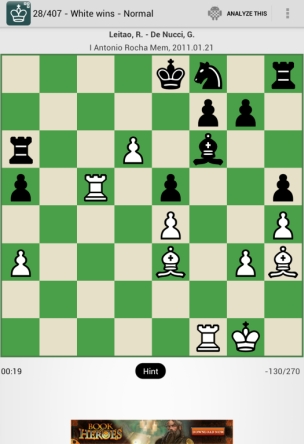 iChess is a
superb chess tactics exerciser program
developed by
Asim Pereira. Now available for both Android and
Apple
systems, I find
iChess to have several advantages over the tactics
trainer found in
Chess.com's iPad app. First of all, each tactics exercise
comes from a real life game. (You'll see the players and date of the game
listed just above the chessboard.) Secondly, if you make a mistake,
you don't have to start completely over with the combination as you would have to do
with Chess.com's trainer. Instead, you just keep trying at the step where you're at.
Thirdly, you have some control over the amount of effort it takes to solve each
puzzle you encounter. Difficulty levels offered are: Normal, Advanced, and
Master. Finally, you don't have to have an active online internet
connection when playing. Nor do you need to
pay a monthly fee to have access to additional tactical exercises.
iChess is a
superb chess tactics exerciser program
developed by
Asim Pereira. Now available for both Android and
Apple
systems, I find
iChess to have several advantages over the tactics
trainer found in
Chess.com's iPad app. First of all, each tactics exercise
comes from a real life game. (You'll see the players and date of the game
listed just above the chessboard.) Secondly, if you make a mistake,
you don't have to start completely over with the combination as you would have to do
with Chess.com's trainer. Instead, you just keep trying at the step where you're at.
Thirdly, you have some control over the amount of effort it takes to solve each
puzzle you encounter. Difficulty levels offered are: Normal, Advanced, and
Master. Finally, you don't have to have an active online internet
connection when playing. Nor do you need to
pay a monthly fee to have access to additional tactical exercises.
One of iChess's best features is that you can easily add more exercises.
Additional packages are 99 cents each and typically contain anywhere from 200 to
300 puzzles. Some of these packages have a particular theme to them.
For example, there is a 300 puzzle package on "Endgame Tactics", another 300
puzzle package covering the Sicilian Najdorf (Be2), and a 275 puzzle
package titled "Magic of Mikhail Tal". Currently a dozen additional
packages are offered with more being made as time goes on.
All good tactical trainer programs offer a "hints feature" for
those times when you are truly stuck but don't want to skip the problem or see
the whole solution. iChess offers a simple
but very effective means of providing hints. If you get stuck, pressing the Hint button
will outline the target square of the desired move.
iChess features sharp graphics and the piece style used is one
of my favorites. 6
different pairs of board colors are offered--and they are all excellent color
combinations. There are also multiple ways offered of progressing
thru each puzzle set. You can configure the program to offer each
challenge sequentially, randomly, or, via a "bird's eye view" feature, you can
directly choose a particular puzzle by number.
You can easily email a puzzle (as a ".jpg" file) or share a
puzzle via Twitter or Google+. iChess also offers "one button integration"
with Analyze This
(described more below). You can even import a PGN file of your choice into
the program and use iChess as an "opening exerciser"! All in all, I
find
iChess to be the best tactical chess trainer I've yet
encountered and I highly recommend it! The free version shows a small ad
at the bottom of the screen. You can eliminate ads by purchasing the paid
version for only $1.49.
Analyze This
 Once
I have completed playing a chess game, I always put it on a computer for
analyses. I find it interesting to see what other lines I could have
played, tactics I've missed, and how well the computer rates my overall play as
well as my opponent's. I've often used ChessMaster on a desktop system
to analyze a game overnight. I then save and play back the results at a
later time.
Once
I have completed playing a chess game, I always put it on a computer for
analyses. I find it interesting to see what other lines I could have
played, tactics I've missed, and how well the computer rates my overall play as
well as my opponent's. I've often used ChessMaster on a desktop system
to analyze a game overnight. I then save and play back the results at a
later time.
There is another way of analyzing your game with a computer
that doesn't require several hours of pre-processing. By putting a
chess program in "analyses mode" or by using a program developed specifically for
analyzing chess positions, you can interactively study your game. This
type of analyses has the computer engine displaying its best thinking lines in
real time as well as providing you with an overall score of who is ahead. Asim
Pereira has developed just such a program called
Analyze This.
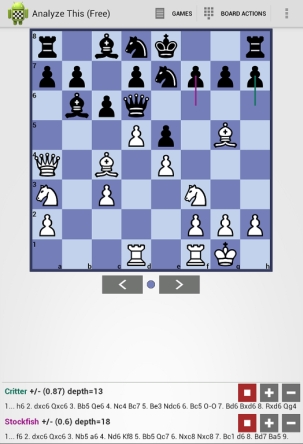
There are two key features with
Analyze This that really help it standout amongst other
programs that perform chess analyses. First of all, it comes with
not one but two first rate chess engines. Both
Critter and the latest version of
Stockfish are included with Analyze This. You
can run one or both engines simultaneously. Secondly, this program
provides you with excellent visual queues as to the current best line computed
by each engine. A line is shown from the source to the target square for
the best move currently evaluated. Each line is color coded to a
specific engine. Thus you can easily see, at a glance, which engine is
favoring a particular move. The program also does an excellent job of
displaying each engine's favored move, even if they both favor the same move.
Sometimes, you may wish to see multiple lines of play from one or more of the
chess engines. This can be done "on the fly" just by pressing the "+" key
to add a line or the "-" key to remove a line. Additional lines will be
shown below the chessboard. Though only the most favored move, from
each engine, will be visually shown on the chessboard.
Some basic settings are offered. You have the ability to switch
on/off the board coordinates. As with iChess, you can choose one of 6
different pairs of board colors. You can easily and quickly reset the
board to the starting position, clear the board to quickly set up your own
position, and flip the board so black is playing from the bottom.
As with his
other chess programs,
Asim Pereira offers
Analyze This in both
free and
non-free "Pro" versions. The Pro version offers the ability
to import additional UCI chess engines into the program and costs only $1.99!
Whether you just opt for the
free version or spend a couple of bucks to go "Pro",
you'll find
Analyze This to be an excellent study partner for improving your
chess!
Archived Handheld Chess Overview
Material
Much of the rest of the material on this page (immediately
below) was written 9 to 14 years ago.
It covers some of the dedicated chess handheld computers that were available
then. In general, the dedicated chess units tend to have screens that work
well outdoors or in other brightly lit environments, but provide poor visibility indoors
in comparison to a modern smartphone or tablet. You can still find several of the models mentioned below
for sale at various retailers on the internet. Be careful when shopping
for older chess computers handheld or otherwise. Prices for the same model
can vary dramatically from one place to the next. For some hard-to-find
models you may end up purchasing your dedicated chess computer from smaller (less
well-known) retailers or individuals.
ChessMaster for the Nintendo GameBoy
Probably the first widely available handheld LCD chess program was the
ChessMaster cartridge for the original Nintendo GameBoy. It was quite successful
and when the Color GameBoy was introduced, a newer version of GameBoy
ChessMaster soon followed. As for program strength, I’d give the color
cartridge a rating of around 1700 to 1800 Elo when played at classical tournament time
controls (40 moves in 2 hours). Unfortunately, the GameBoy suffers from a
too small and murky display for many people to comfortably use for long periods
of time. Also, it is extremely difficult to save a game for future play.
(Saving
and retrieval of a previously saved game requires the entry of a ridiculously
long and cryptic password!) Additionally, the GameBoy suffers from very short
battery life. Long games are best done with an AC adapter attached. This defeats
the portability aspect of the unit. Finally, because the original GameBoy ChessMaster
cartridges are no longer being manufactured, they are becoming extremely hard to
find. Your best bet for locating a cartridge is at an internet auction site such
as Ebay. You can learn a lot more about GameBoy ChessMaster on a web page where
I’ve compared it with the Excalibur LCD handheld unit. Just click on this
link:
LCD Chess versus GameBoy ChessMaster
Programs for the Nintendo GameBoy Advance
With the debut of the GameBoy Advance in 2001, Ubisoft
released a version of ChessMaster for the GBA (Game Boy
Advance) . Around the same time a company called Titus released Virtual Kasparov for the GBA.
I have no experience with either program but did receive a letter from
Eric
Fauman that summarizes the characteristics of these two programs: